
|
||||||
|
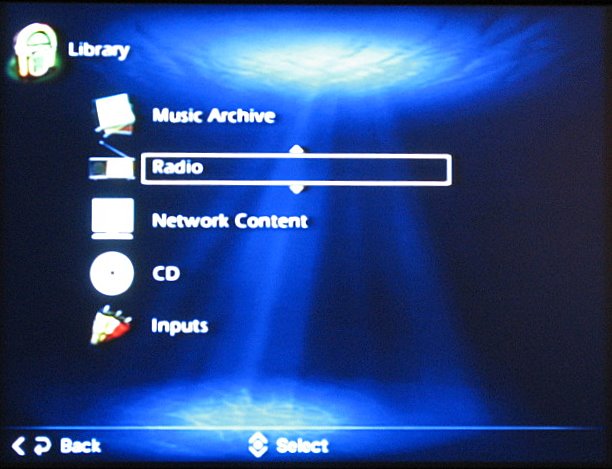
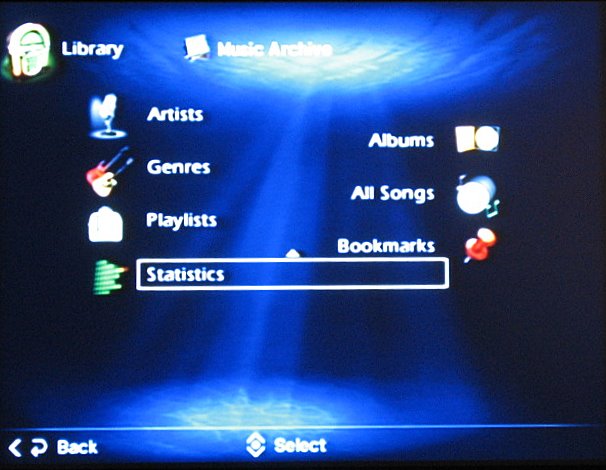
When you first put a CD into the unit, assuming you have configured it to be on your network with access to the internet, the MCX-2000 will query the Gracenote CDDB online database for album, track, and artist information, and will automatically update the view once it finds and downloads the data (you can also set it to read CD-Text data of discs supporting that feature). If you choose to rip the CD to the hard drive, the data will automatically be inserted into ID3 tags. If it can't find the data, or you wish to modify it, you can plug in a standard PS/2 keyboard and make those changes manually. Actually, as a side note, anytime you need to do any type of data entry into the MCX-2000, the keyboard will save you immense amounts of time. It would have been nice if the Yamaha supported wireless keyboards (read: editing from the sofa). In any case, having your song data as accurate as possible is very important for organization. Once in your library, selecting the section titled "Music Archive" takes you to all of your stored music. Here, you can browse through your collection by artist, genre, track title, album title, playlists, or bookmarks.
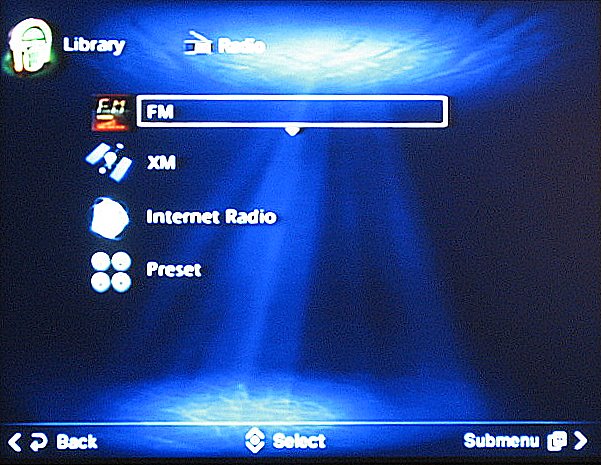
Bookmarks are an interesting feature. Not unlike an On-The-Go playlist on an iPod, the bookmark feature basically allows you create a playlist on the fly. Say you are browsing through your music, and you realize you have a lot of songs with a travel theme, so you want to make a playlist of them. You simply bookmark each of the songs, and then, when you visit the bookmark screen, they have all been collected there. You can play them right from that page, or you can create a playlist from the bookmarks. Once you have your playlist, you can clear the bookmarks and start again. Playlists can then be burned to CD or accessed from other clients, as will be discussed later. The Radio features of the MCX-2000 include access to FM, XM, and Internet Radio stations. While I understand that as a music-centric system Yamaha decided to exclude an AM tuner, this would have been a very useful feature to include. This will become apparent when I discuss the recording capabilities of the MCX-2000. There are 10 groups of 10 channels each available to save as preset stations. For those of you with a math phobia, that's 100 preset stations! The best part is that any preset station can be of any type. I really appreciated this feature, as you can easily go from your favorite XM channel to your favorite local FM station without having to navigate through several menus. By dividing the stations up, you can also group them as you choose. For example, my Group B stations could be all classical music, while my C group may be my talk radio channels.
Internet Radio has definitely come a long way, and the MCX-2000 handles it quite well. You can browse the directory by genre, most popular, new stations, recently played stations, and locations. You can also enter URLs directly. Again, having a PS/2 keyboard is handy here, although you can also access the server via a web browser to enter URLs and modify song data. This is a great feature, but I could not get it to work properly on my unit. I have to assume that this is because I was running beta software on the MCX-2000 instead of the stable release. The other very interesting and surprisingly well implemented item available in the Internet radio area is a podcast directory. Podcasts are prerecorded audio (and video, but this unit sticks to the audio variety) programs available on the internet. They can be talk shows, music shows, shows about television, or anything else. If you can think of a topic, chances are there is a podcast out there about it! People create these shows and usually will put them into an RSS feed (RSS stands for Really Simple Syndication). On your computer, you can then subscribe to these feeds with a program that will automatically download the shows as they become available. The MCX-2000 has a directory of podcasts created from these feeds. Instead of having to subscribe and download the entire podcast, the MCX-2000 can stream the show directly from the source. The result is on-demand access to these programs, which is a very cool feature. Speaking of cool features, having an XM tuner built in really increases the value of the system, even if it is somewhat limited in terms of recording and streaming (more on this later). Activation is simple. All you have to do is sign up for the service and then go to their website and type in your Connect-and-Play antenna's (sold separately) serial number, and within 15 minutes it should activate. Actually, in my case we had quite a bit of difficulty getting this to work, but in the end we found that it was a faulty antenna, and had nothing to do with the MCX-2000. Having only limited experience with XM Radio in the past, I was excited to try it out. There is definitely quite a bit of excellent programming. My favorite station was channel 40 – Deep Tracks – which features lesser known but sometimes better music from tons of classic groups. As a sports fan, I really liked the Major League Baseball programming, which presented at least one team's local radio broadcast of each game every night. I also tried to access the two new Dolby Digital 5.1 stations (XM Pops and Fine Tuning), but could not get a 5.1 signal out of the MCX-2000. It is not documented to support these XM HD Surround stations, so frankly I didn't expect it to work. Having XM service was quite a thrill, though I do have some complaints about some of the XM features of the MCX-2000. My biggest gripe is with the interface. There is no way to directly access a channel by typing in numbers on the remote, which seems like it should be a pretty basic function. You need to actually go to a menu structure, and use your arrow keys to enter the channel number into a box, which then takes you to the channel. You do have channel-up and channel-down buttons, but for some reason when I used them, it would skip most of the available channels, rendering them quite useless. I don't see why XM channel navigation needs to be that complicated. An elegant solution would be to have some sort of on-screen programming guide as we do with cable and satellite television. Without a programming guide on my TV, I would never remember where all the channels are. The same goes for XM radio. A program guide would also keep you informed of what was playing on the stations that have rotating programming, such as the Major League Baseball or National Hockey League channels. There are undoubtedly enough XM stations to necessitate a guide anyway. My other complaint is that the sound quality of the XM stations was somewhat below my expectations. I realize there is a bandwidth crunch for satellite-based services, and the more channels you try to cram into your allotment, the lower quality each will be. However, I did expect it to sound nearly as good as a CD, which it didn't. Most of what I listened to sounded more like MP3 quality music. This is not to say it was un-listenable or bad, just that I was expecting more. This is perhaps the way XM radio is, and is not related to the MCX-2000 itself, but I have no frame of reference for comparison. Overall, though, I really enjoyed trying out XM radio. In addition to the wide variety of music, there are a lot of great sports and news stations, which in any case don't require the best sound fidelity.
|
||||||





 YouTube
 Facebook
 Twitter
 LinkedIn
 Pinterest
 Google+
 Instagram
Magazine Publishing Solutions by
 Advontemedia