
|
||||||||||
|
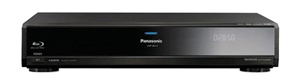
Introduction Blu-ray and HD DVD are the two high def media introduced in the last two years. Launching just shortly after its rival HD DVD, Blu-ray was immediately hammered due to concerns of quality vs. hype. Samsung was the only manufacturer that got a Blu-ray player to market at launch, despite the proclaimed massive support from the hardware community. Initial software titles varied in quality from mediocre to average. Much of the blame was placed on Samsung, with fans in disbelief that it could actually be an issue with the HD software, but those comments were put to rest later as better software was released. The Panasonic DMP-BD10 represents the second Blu-ray player to hit the market, but unlike the Samsung player, the BD10 is not a PC-based player. What you have here is a design that is more akin to standard DVD players on the market today. This eliminates some of the issues associated with first generation players, including speed and reliability. The Design
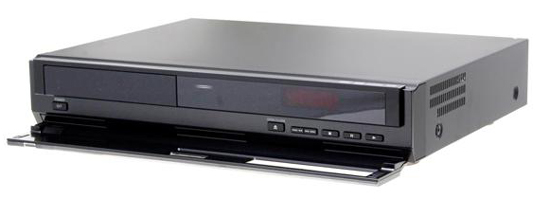
The DMP-BD10 is quite possibly the most attractive looking Panasonic player to date. The construction is very solid, and the black glass façade gives it a more regal look than their standard line. The glass panel on the front flips down to reveal the disc tray, along with common buttons such as eject, stop, play and skip. There is also an LED readout that can be dimmed but not fully turned off, and putting the tray back up while playing doesn't block the LED either. While the front may look black, you are just seeing the black matte of the plastic through the glass. The LED display isn't bright though, so light control isn't too bad.
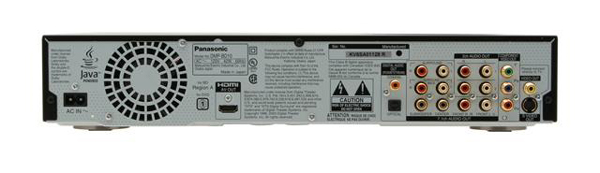
The back panel is pretty much standard fare.
You'll find an HDMI output along with the standard analog component, composite,
and S-Video outputs. There are two digital audio outputs (coaxial and Toslink), two pairs of analog stereo outputs, and a 7.1 analog audio output. I
was pleased to see Panasonic offer support for 7.1 channels right out of the
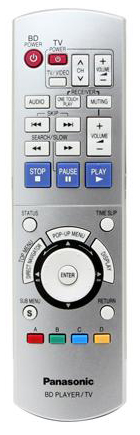
gate, making this player futur I don't know of any movie titles recorded with 7.1 discrete channels though, so I wouldn't hold your breathe on that one. The only exception may be We Were Soldiers, which had a height channel made for it in specific venues, but I don't think the Blu-ray release incorporated that channel. One thing noticeably lacking from the back panel is an Ethernet connection. This would allow the player to be firmware-updated directly off an Internet home network. It is essential for BD-Live, which is a subset of Blu-ray and allows for web-based interactivity. Currently the Sony PlayStation 3 is the only Blu-ray player on the market that looks like it will support this feature. It is a shame when players costing nearly three times as much can't match the features of entry-level designs. The included remote control is good, but not great. It is on the larger size in overall build, and has a flip up section that reveals a numeric keypad and setup buttons. The center of the remote has a large dial that doubles as the menu navigation keys and a jog dial. The jog dial is very sensitive though and I ran into issues where the player would start frame forwarding when I was trying to simply navigate. I also wish the remote were backlit, as the button configuration is not typical of most standard DVD remotes, so it is hard to navigate in a dark room.
|
||||||||||
 e proof in some regards. Currently I know of only
one Blu-ray title supporting seven discrete channels (X-Men: The Last Stand),
but I am sure we'll see more as the format progresses.
e proof in some regards. Currently I know of only
one Blu-ray title supporting seven discrete channels (X-Men: The Last Stand),
but I am sure we'll see more as the format progresses.




 YouTube
 Facebook
 Twitter
 LinkedIn
 Pinterest
 Google+
 Instagram
Magazine Publishing Solutions by
 Advontemedia