
|
||||||||
|
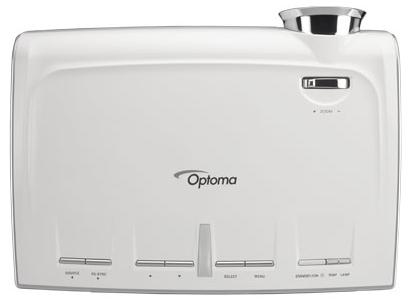
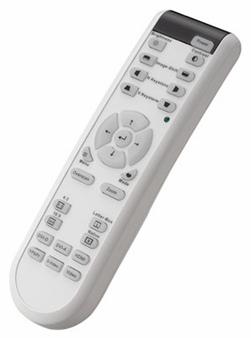
The top of the unit has buttons for power, menu control, source selection, and re-sync. You could operate the unit without the remote control in a pinch, but it is easier with the remote, which has direct access controls for most common features such as Power On/Off, Contrast, Brightness, Image Shift, Keystone, directional controls, Display Mode, Zoom, Menu, Overscan, Aspect Ratios, and Source selection.
The HD73 has two remote sensors, one on the top of the unit and one on the front, making it fairly easy to operate with the remote bouncing off the screen or pointed straight at the unit.
Connections and Input Signals Personally I think it is about time to eliminate composite video jacks, but someone will want to connect their old video camera or VCR to it, so I guess the projector industry is still thinking of those people. The
resolution is 1280x768, via a single Darkchip3 DLP® chip. A projector with
similar specs three years ago would have cost over $10,000 so like most
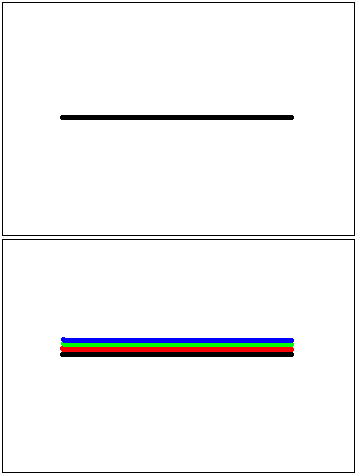
technology, the prices are coming down, down, down. Another interesting addition is the RS-232 control and 12v relay trigger. These will allow control of the projector when it is mounted behind a wall or in a hushbox by use of an automation system. Years ago, automation systems were only for very expensive setups with a lot of custom programming and equipment required. Today there are several software options that allow control of projector and other equipment via RS-232 from a standard PC. The HD73 also supports 1080p input signals. This may be important to users who have sources that output 1080p natively (as in Blu-ray players), but in general you should have your device just feed the projector a 720p signal and have the source do the scaling, not the projector. It is also worth noting the projector does not support 24 or 48 fps input signals, but without an expensive video processor, you are not going to miss these anyway. Obviously, as a Secrets readers, you already understand the benefits of high definition video signals. Using the HD73 with an HDTV feed from either a cable provider or one of the many satellite providers is nothing short of spectacular. I personally use Bell ExpressVu, the Canadian equivalent of Dish Network, and Sports, Network TV, and movies all look exceptional on this projector. I would also recommend one of the new HD players which are starting to become reasonably priced. Besides purchasing one of the dedicated Blu-ray players, if you have an XBox 360 already, you can get the HD DVD player add-on for only $199, or you can buy a Toshiba HD DVD player for $299 if you shop around. Blockbuster is also now renting HD DVDs and Blu-ray discs. For kicks, I did watch some Standard Definition (SD) BBC television one afternoon with this projector, and I can say it looked terrible. This isn't the fault of the projector, but rather the fact all broadcast 480i signals on a 106" diagonal look terrible, regardless of how good the de-interlacing and scaling is. It is time to kiss SD programming goodbye, and welcome HD satellite or cable TV into your home theater. Image Quality and Processing I watched several DVDs on this projector, and the video processing and scaling are very good (480i from a DVD is a lot better quality than from satellite or cable programming). The projector comes with Faroudja DCDi processing which is a very decent solution to be found in a projector at this price point. So, even if you end up with an old film-based 480i source, the projector will still be kind of watchable (although I can't say I would recommend it). Rainbows What would a DLP projector review be without the mention of rainbows? A few years ago, rainbows from single-chip DLP projectors were a serious issue because of lower speed color wheels causing even the average viewer to see rainbows in the image. The rainbows occur when you move your eyes quickly across the screen, and you see the red, green, and blue images separated (see illustration below), because the color wheel is showing the red, green, and blue images one after the other while the wheel spins. Rainbows do not occur with three-chip DLP projectors, because a color wheel is not necessary. Now, with faster color
wheels, they are far less noticeable and hardly ever distracting.
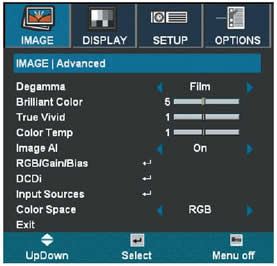
Noise Level The noise level of this projector is very low. In the standard lamp mode (not bright mode) Optoma claims 27dB. I can say I only ever noticed the fan noise when I turned the unit on, but while watching movies at 6 feet away from the projector, it was never an issue. With the projector in Bright mode (or if you are in a situation where you must run the unit in High-Altitude mode), then the fan could be an issue in the quiet scenes of movies, but not enough to annoy most viewers. Menu System The menu system in the HD73 is fairly easy to operate and hides most of the advanced features from the top levels which should avoid confusing new users trying to calibrate with DVE or AVIA for the first time. I won't spend time talking about top levels menus, so just assume all the usual suspects are present (contrast, brightness, color, tint, sharpness, etc.) The advanced menus allow the user control of the DCDi processing options like Edge Enhancements and Noise Reduction, the ability to change color temperature, gamma, and even adjust both gain and bias for red, green, and blue. The projector does come with some predefined default which we will discuss below in the measurements section.
|
||||||||
 The HD73 is
about the same as other modern projectors I have watched with a 5x color wheel.
During normal viewing I hardly ever noted rainbows. During the scrolling
credits, I could easily see them, but I am not particularly sensitive to them,
so personally I don't see the issue. I know some people are sensitive to
them, so if you watch a lot of black and white movies then you might want to
arrange a demo before you purchase, but for most of you this should not be a
concern.
The HD73 is
about the same as other modern projectors I have watched with a 5x color wheel.
During normal viewing I hardly ever noted rainbows. During the scrolling
credits, I could easily see them, but I am not particularly sensitive to them,
so personally I don't see the issue. I know some people are sensitive to
them, so if you watch a lot of black and white movies then you might want to
arrange a demo before you purchase, but for most of you this should not be a
concern.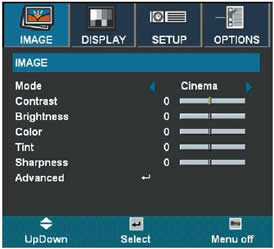





 YouTube
 Facebook
 Twitter
 LinkedIn
 Pinterest
 Google+
 Instagram
Magazine Publishing Solutions by
 Advontemedia