
|
|||||||||
|
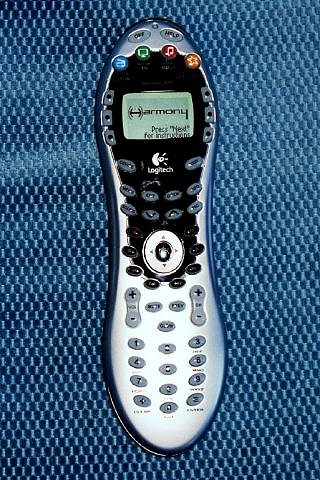
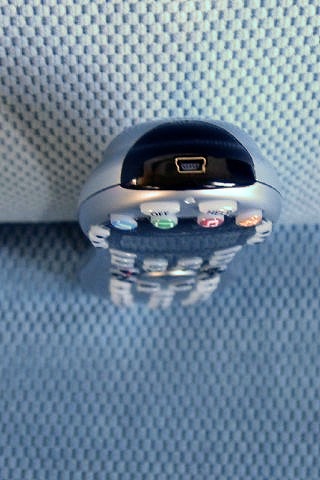
Introduction Reviewing home theater equipment means getting acquainted with a new remote control unit at least once a month. It continues to amaze me that consumer electronics manufacturers cannot agree on a standard layout for remote control buttons or functions. Wait, did I really just say that about the same industry that gave us Beta and VHS, DVD-A and SACD, Blu-ray vs. HD DVD? Never mind. Many remote controls found in consumer electronics gear are described as "Universal." However, few do the job effectively. Typically, a universal remote will execute some, but not all, of the necessary commands to operate a device. Furthermore, most component remotes require a laborious setup routine that involves pushing a series of three or four digit commands (found on a densely worded list located at the back of the owner's manual) in a trial-and-error method that may or may not turn on the component. Harmony (owned by Logitech) makes universal remote-control units designed to replace the original remotes for your home theater equipment (such as TV, DVD player, receiver, etc.). Their products, ranging from $129 to $499, use a software-based interface that allows you to program the remote control from your computer via a USB cable. The new Harmony 670, at $149 suggested price, is described by Logitech as a "mid-range" product designed especially for use with DVR's. Since I spend a lot of time with remote controls (who doesn't?), I was very interested to see how well the Harmony product compares with the cornucopia of traditional component remote controls. The Design The 670 is a throwback to earlier Harmony designs, featuring a narrow, peanut-shape familiar to any TiVo owner. As a result, the tapered 670 fits comfortably in the hand. Unlike higher-end Harmony products that utilize a powered-docking station, the 670 uses four AAA batteries. The remote is fully backlit at the touch of any button, which is a blessing because the 670 sports a lot of buttons (46 by my count, not including the four-way navigation wheel and "Enter" button). The Harmony has a monochrome LCD screen (some of the more expensive Harmony models have full-color screens) flanked by six buttons, three on each side. Those six buttons execute a variety of commands based on the component being controlled at the time (more on that later). Particularly useful are four color and icon-coded buttons on the upper end of the remote, labeled: "Watch Movie," "Watch TV," "Listen to Music," and "More Activities." Once I programmed the remote, my five-year old knew how to push the button with the drawing of the TV on it, which would turn on my Motorola cable box/DVR, turn on the TV and select the proper input, power up the receiver, and set the receiver's input to the proper input. How does the Harmony achieve this nifty trick? USB, of course. Setup The 670, like all Harmony
remotes, is programmed not through the control unit itself but through
software. So, setting up the remote control involves installing a new
program on your computer. I loaded the installation CD in the computer, and
the software guided me through a step-by-step process for configuring the
remote control. The software first asks you the types of components in your
system, which requires you to know both the manufacturer and model number.
Harmony claims that its software can program over 175,000 devices from over
5,000 manufacturers, so it had no problem identifying the various receivers,
DVD players, VCR, and TV in my main system, including my Comcast-branded
Motorola 6412 combination dual-tuner HDTV DVR/cable box. Next, the Harmony software runs through a series of questions (in sometimes painstaking detail) asking you to set up various activities such as watching a movie. Here, although the program tries to keep it as simple as possible, the user still needs to identify what tasks are associated with a given activity. For example, to watch TV I wanted the 670 to turn on my TV, select the HDMI input, turn on the cable box, power up the receiver, and set the receiver's input to "TV." It will also ask you if you want the volume control on the 670 to operate the volume on the TV or your receiver/pre-pro, and whether the channel up/down buttons should activate the TV or cable box. The Harmony then sets up a series of commands so that all I need to do is hit the green button with the little television on it that says "Watch TV." You repeat the process (for multiple tasks beyond the three hot buttons on the remote, you hit the "More Activities" button). When finished with the setup routine, the software automatically loads the commands onto the remote using the supplied USB cable (this can take several minutes). Then it's time to test the unit and make sure that everything works as planned. In Use Beyond the basic four hot buttons, the 670 has several dedicated buttons commonly found on DVR's, such as Guide, Menu, Info, Page Up/Down, all of which worked perfectly. Likewise the Harmony's center scroll wheel navigated the cable box's on-screen channel guide without a hitch. The Comcast DVR has its own hot buttons, such as My DVR and On Command. These commands were accessible on the Harmony, although not with the same one-touch button found on the dedicated DVR remote control unit. This is where the LCD screen comes in. After pressing the Device button on the 670, the LCD screen lists your selected devices (here labeled PVR), and once selected, I was able to eventually find the On Demand and My DVR buttons. The dedicated 10-pad keyboard on the Harmony remote made channel selection easy, but I wished I had dedicated input buttons for the receiver inputs instead of scrolling through several LCD screens to get there. Also, the 670 has an unusual layout for DVD navigation buttons: they are arranged in a circular pattern around the navigation wheel, which caused numerous wrong entries, especially in a darkened room. As far as I know, the 670 is the only Harmony remote that doesn't use the traditional rectangular block of buttons for DVD functions. Perhaps it was a trade-off required for adding the DVR buttons. While the 670 certainly did a good job of handling the various pieces of rotating equipment in my rack, it did suffer from the occasional hiccup, such as not turning on the TV set when I pushed the "Watch TV" hot button. However, the problem was easily resolved by pushing the Help button on the remote, which activated a help menu on the LCD screen similar to that found on any software program. The first question asked was, "Is the TV on?" I pushed the No button, which immediately resulted in the TV turning on and a new message asking, "Did that fix the problem?" I half-expected it to ask me "Are the pod bays open, Dave?" Conclusions The Harmony 670 is a fine
solution for those seeking to remove the clutter of remotes that litter so
many couches and coffee tables in our homes. It provides a way to program
multiple components and activity macros using a software interface familiar
to anyone who has installed a program on their PC. Although I wish the 670
had some of the features available in Harmony's higher-end products, such as
a powered docking station and brighter color screen, at $149 (and available
for less through various retailers) it represents an excellent entry point
for those interested in a universal remote control unit. - Ross Jones -
|
|||||||||





 YouTube
 Facebook
 Twitter
 LinkedIn
 Pinterest
 Google+
 Instagram
Magazine Publishing Solutions by
 Advontemedia