
|
|||||||||
|
Introduction It seems no matter who I talk to nowadays one question repeatedly pops up, "So what do you think about this looming format war between HD DVD and Blu-ray?" Either that or I get asked what I think about one format or the other. While I definitely have some initial impressions, I personally think it is far too early to ask these kinds of questions. I would be more comfortable answering questions specific to the available hardware or software. While this can serve as a gauge for where a particular format is at the moment, it by no means defines it for the long haul. I remember the infancy of DVD and how hardware and software were a mixed bag for quite awhile (okay, so it's still a total mixed bag) and know that what we are getting here is a glimpse of what the future has in store for these new formats.
Unfortunately, that initial glimpse into Blu-ray's future has been extremely clouded. Since we do have a format war looming, I actually expected to see both camps put their best foot forward on both the hardware and software side. HD DVD has delivered exceptional software support with very good HD transfers and a nice array of movie selections. Their hardware support stumbled a bit out the door, but Toshiba has been diligent in providing exceptional firmware updates, including support for high-resolution multi-channel lossless audio. Blu-ray, like its competitor, came out of the gate with only one player. While this player does do a better job in some areas than its competitor, it stumbles on the majority of them, leading me to the overall suggestion of waiting it out to see what the next player brings to the table.
Blu-ray (BD) software (movies) has also been less than impressive. Sony's initial library was plagued with artifacts and less than stellar video quality, and Lions Gate didn't improve on it much. Thankfully Warner, Disney, and some of Sony's newer releases have been improving on this side of the house. We'll talk more about that later though. For now let's focus on the Samsung BD-P1000 and what it does and doesn't bring to the table.
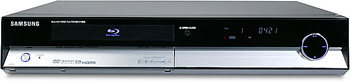
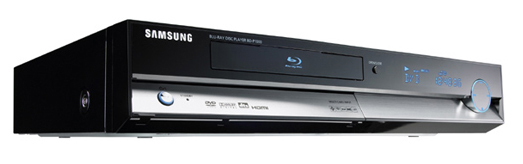
The BD-P1000 The BD-P1000 is probably the nicest looking player Samsung has delivered to the U.S. This is what I would expect from a next generation piece of hardware at a rather high price point (at least compared to Samsung's standard DVD player offerings). The chassis is an attractive piano gloss black, and the front panel is elegantly lit, with attractive blue LEDs. The front panel has the standard buttons available with the main controls occupying a circle on the right side of the face. There is also a flip down compartment on the front panel where you can access the memory card readers. My only complaint up front was the lack of a real dimmer for the LEDs. I am one of those who likes to keep my theater room pitch black, so the ability to turn off the front display lighting is pretty much a must for me.
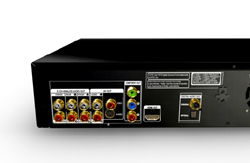
The front panel memory card readers support most of the available portable media on the market today. Multi Media, Secure Digital, Compact Flash, and Micro Drive are supported directly, and Memory Stick, Memory Stick Duo, Memory Stick Pro, Memory Stick Pro Duo, RS MMC, and Mini SD are supported with an adapter. These can be used for photos and music files. The back panel looks about the same as every other DVD player on the market these days. You'll find analog and digital support for both audio and video. On the video side there are composite, S-Video, component video, and an HDMI output. On the audio side you'll find a coaxial digital, SPDIF, six-channel analog, and HDMI output. The HDMI output is HDMI v1.1 compliant, allowing for high-resolution multi-channel PCM audio.
Operability of the player overall is okay, but not great. The player's remote isn't very good, and the layout makes it cumbersome to work with. While I wouldn't say it is a monumental failure (like the remote for Toshiba's HD-A1), it leaves a little to be desired. Blu-ray has some differences in operability that make it a bit of a learning process. Like HD DVD, it uses some popup menus while the film is playing. While some software does this by simply selecting "Menu", others accomplish it by pressing the "Popup" menu key on the remote. This makes no less than three different menu options on the remote control. Ugh. There are also a lot of keys that are used for a TV, which get in the way if you are trying to navigate in the dark. Since this remote is not back-lit, I was hoping for a design that was a bit more familiar. Laying the keys out like most standard DVD player remotes would have been a nice start, but I guess that wasn't in the cards. While I do like the buttons on this one far better than the Toshiba HD-A1, it really isn't that much better in the big scheme. Setup and usability of the Samsung player are also a bit of a mixed bag. All of the setup options are straightforward and allow the end user to select default languages, screen types, output resolution, and audio preferences. The problem is the lack of advanced setup options in the video and audio department. I will go more into the video and audio setup as I cover these specific areas in the review. Before I do that, let's talk a bit about the Blu-ray format.
|
|||||||||
 Unfortunately
there is no Ethernet connection to hook the player up to a network for
firmware updates. This means that Samsung must use either a DVD or CD for
updates, or the player would have to be sent in. While a CD or DVD solution
doesn't bother me, it tends to take longer to get updates this way than with
a direct connection to your computer. (Samsung has already announced a firmware update for this player
that will allow for more advanced interactivity and some other changes. This
firmware will be available for order as a CD or as a download from the Samsung
website. ETA is October, 2006.)
Unfortunately
there is no Ethernet connection to hook the player up to a network for
firmware updates. This means that Samsung must use either a DVD or CD for
updates, or the player would have to be sent in. While a CD or DVD solution
doesn't bother me, it tends to take longer to get updates this way than with
a direct connection to your computer. (Samsung has already announced a firmware update for this player
that will allow for more advanced interactivity and some other changes. This
firmware will be available for order as a CD or as a download from the Samsung
website. ETA is October, 2006.)




 YouTube
 Facebook
 Twitter
 LinkedIn
 Pinterest
 Google+
 Instagram
Magazine Publishing Solutions by
 Advontemedia