
|
|||||||||
|
Introduction Believe it or not, High Definition has been around for now for a long time. I remember seeing HD displays at local electronics stores over seven years ago. I bought my first HDTV six years ago, and I've owned several since. Even though HD displays have been commonplace in our electronics market for years, content has been slow to develop, mainly because upgrading to HD broadcasting equipment is so expensive. Cable and satellite TV were a bit late to adopt, and even now there isn't a huge amount of content to sift through. Much of the content we do have is either cropped, zoomed, scaled, or compressed to death, making the experience well short of what it could and should be. What the market has really lacked to get the HD ball rolling is pre-recorded high quality content. Well that high quality content has arrived. We are at the forefront of what will hopefully be a revolution in video playback. Pre-recorded high definition has been limited to the largely unsuccessful and short-lived D-Theater format (tape) up until now. D-Theater did offer extremely good high definition video and high bit rate audio, but its limited availability, high price, and tape-based delivery system just did not score well with the average consumer. Even among HT enthusiasts, you won't find a lot of support. But now, two HD disc formats are going to battle it out for your dollars, and Toshiba has fired the first shot in the battle for a consumer friendly pre-recorded HD format with HD DVD. HD DVD was developed by Toshiba and NEC, and is based on the already popular DVD format. Unlike traditional DVD, HD DVD can utilize a blue laser, allowing it to read an even smaller pit area on a disc. This allows for a dramatic rise in capacity. A single layer HD DVD disc can hold 15 gigabytes worth of data and a dual layered single sided disc can hold 30 gigabytes. That is over three times the amount of data that a dual layered DVD can hold! Because of this, and some other factors, movies can be mastered at high definition resolutions and deliver images and sound that have not been possible with the standard DVD format. Notice that I said sound as well as images. Not only will we have high definition video content, but the audio will be lossless multi-channel. That means the surround sound will actually be better than a conventional CD, with 24 bit/96 kHz tracks.
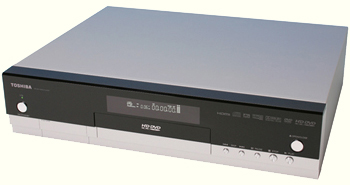
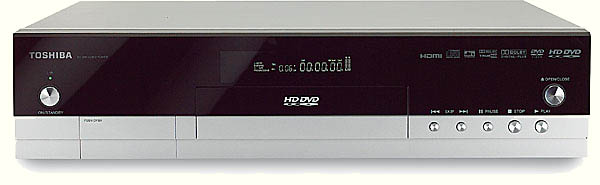
The Build The HD-A1 has a very sleek look and is on the larger side. The front panel has a black front that is complimented by a silver base and surrounding case. The buttons are large and silver. The player features a small display on the front panel that tells you the normal information like title, chapter, output resolution, and audio. It is easy to read from a distance and does little to distract during playback. The display can also be adjusted to different brightness levels from the remote or can be turned off completely.
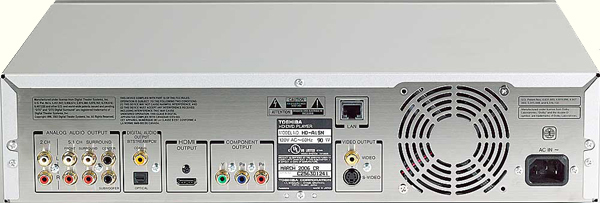
The back panel is pretty much the same as any DVD player nowadays with the exception of an Ethernet port. This can be used to plug the player into a computer and download firmware updates from Toshiba's website. We are hoping that this will be well-supported, because the player has some issues that we hope are addressed in a fairly short amount of time. You'll also find the typical S-Video, composite, and component video outputs, as well as an HDMI digital video/audio output. An optical Toslink and coaxial digital audio output, as well as six-channel analog audio output are also featured.
The buttons are too small and pretty much impossible to read in even a dimly lit room. The main menu navigation buttons also have some issues. For some reason the down button on the remote doesn't work well and this was the case for a couple of the prototypes I happened to use before this review. I did like that Toshiba included buttons for output resolution on the remote though, rather than having to change resolutions in a set-up screen. Since HD DVD really does not require buttons any different from the DVD format we have now, I don't think a big departure from the remotes we have become accustomed to was necessary, and one this bad was certainly not necessary. Fortunately, this problem can be solved if the end user has a programmable universal remote such as a Pronto or Home Theater Master. I have the latter, and programming it to do all the functions was painless and made the experience a lot better.
|
|||||||||
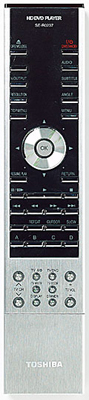 The remote control is quite
large and reminds me more of a remote for a television than a DVD player. It
is very long and a bit skinny with tiny buttons. I was a bit surprised by this
since DVD players and their associated remote controls have been around for
quite sometime and the general opinion on what constitutes a good remote
control has already been pretty well established.
The remote control is quite
large and reminds me more of a remote for a television than a DVD player. It
is very long and a bit skinny with tiny buttons. I was a bit surprised by this
since DVD players and their associated remote controls have been around for
quite sometime and the general opinion on what constitutes a good remote
control has already been pretty well established.




 YouTube
 Facebook
 Twitter
 LinkedIn
 Pinterest
 Google+
 Instagram
Magazine Publishing Solutions by
 Advontemedia