
|
|||||||||
|
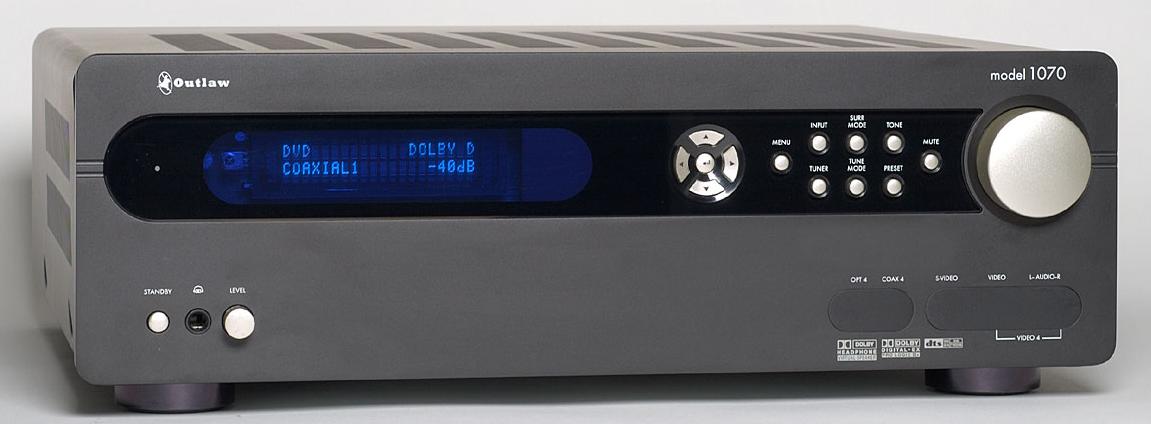
Introduction Outlaw Audio started up a few years ago, selling their own brand of hi-fi equipment. What differentiates them from other companies is that they sell only on the Internet. Further differentiating them is the fact that they don't actually build the products. They contract with other companies to do that. The result is that the prices are about as good as can be had. Like all new companies, Outlaw had a few problems at first, but that seems to an exception now. They carry SSPs, multi-channel power amplifiers, receivers, subwoofers, and other items. The Outlaw Audio model 1070 receiver is the latest example of what appears to be a very cool product at an even cooler price. The Design The 1070 is a 7.1 receiver that handles all the modern codecs, plus having DVI switching. Its power output is specified at 65 watts RMS per channel into 8 ohms, all channels driven. That is not a lot of power, but when you are listening to seven channels while watching movies, that is a lot different than just listening to two-channel stereo with 65 watts per channel. The front panel is spartan, compared to most receivers, with just a few knobs and buttons. From the left are the Standby button (main power button is on the rear panel), and a headphone volume control next to the headphone jack. On the right are Menu, Input, Surround Mode, Tone, Mute, Tuner, Tune Mode, and Preset buttons. To the left of those is a selector button arrangement for scrolling through menus. The Volume Control is to the right. At the bottom are digital and analog inputs for audio and video, additional to the ones on the rear. The rear panel is shown below.
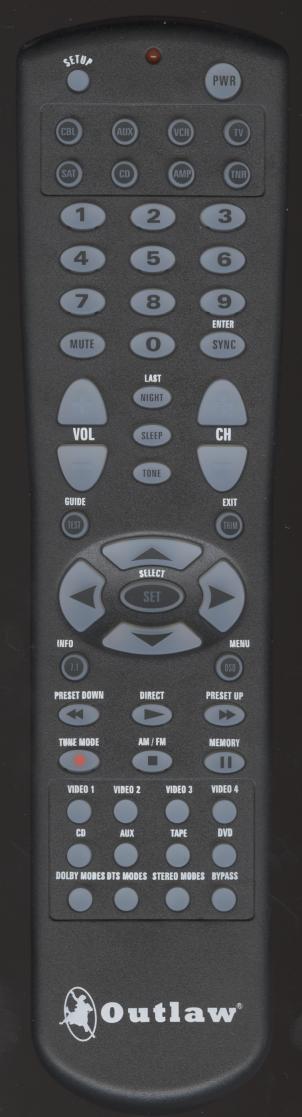
Click on the photo above to see a larger version. From the left, are three sets of component video inputs (100 MHz bandwidth), component video monitor out, analog stereo inputs for CD and Aux, Rec-Out jacks, a 5.1 analog input set for DVD-A/SACD, three sets of composite video/S-Video inputs with associated stereo analog audio input pairs, composite video/S-Video monitor out, three digital inputs (coaxial and Toslink), digital out, pre-outs for 7.1 audio, two DVI inputs and one DVI monitor output. A Bass Management toggle lets you turn it on or bypass it altogether. There are seven sets of gold plated five-way speaker binding posts, along with a switch to select 8 ohm or 4 ohm speakers (selecting 4 ohms just limits the output voltage). The AC power cord is detachable and is non-grounded. There are two fans mounted on the bottom of the chassis. These keep the electronics cool when you have Stallone films playing. The remote control is large and backlit. It is easy to hold and use, at least for someone like myself who has large hands. All functions are accessible at the front panel as well as the remote control.
Click on the photo above to see a larger version. To turn on the receiver, you first press the TNR button at the top, then one of the source buttons at the bottom. It operates like most remotes, and I did not have any issues with it. Setting up the 1070 is like most receivers these days. You press Menu and then go through all the options such as configuring the various inputs for digital or analog, optical or coax, 5.1 or stereo, size of your speakers, distance to your speakers, crossover frequency to the subwoofer, and so on. Each input has an input level trim, so you can adjust each one for keeping the overall volume about the same when switching inputs. This receiver has just about every codec imaginable, but no THX modes. The inputs default to Dolby Pro Logic IIx, since the minimum signal any consumer might use would be at least two-channel stereo. You modify how the input is to be processed by pressing the Surround Mode button. Setting up for external 7.1 (using the analog outputs from a universal DVD player for DVD-A/SACD) requires using two of the analog inputs in the DVD input panel, along with six more jacks to give you 7.1. However, a typical universal player just has a set of 5.1 outputs, not 7.1, so most of the time, you would not use the last pair of input jacks. Certainly, the next version of this receiver should have HDMI and iLink digital inputs which will eliminate the need for 5.1 or 7.1 analog input sets. Finally, good bass management is becoming more common with receivers. On the 1070, you have the additional feature of being able to turn off digital bass management using a rear panel toggle. This takes the processing out of the circuit, if you don't need it. Using bass management lets you set crossover frequency between 40 Hz and 150 Hz. It has 20 Hz increments, and my favorite crossover frequency is 50 Hz, which the 1070 does not have. There is an RS232 port on the back, and I hope some of the things I would like to see implemented can be added in later software versions for this receiver. The tuner is standard FM. There is no satellite radio (e.g., Sirius) or HD Radio capability with this receiver. I doubt these features can be added without a PC board switchout as an upgrade. Auto EQ is becoming common on new receivers, but the 1070 does not have it. However, speaker delay is obtainable through manual procedures, although it is only in 1 foot increments. Perhaps this can be changed to 0.5 foot increments in a future software upgrade. There is 200 ms of global audio delay (the 1070 calls this Lip Sync) for digital TVs that have a problem due to the video processing delay that many of them have. The DVI switching allows two DVI inputs switched to one DVI output for your display. This is an important feature now that so many TVs have DVI or HDMI inputs. If your TV has HDMI, you can just use a DVI/HDMI cable, although you will then need a pair of analog audio pre-out cables from the receiver to the TV to supply the sound. Otherwise, you can just use Toslink optical out from the source to the receiver, for 5.1 surround sound, and turn the volume on the TV itself down or off. When setting up an input for digital signals, you need to turn the Polling option off in the input configuration menu. Otherwise, between music tracks, the input switches to analog, and when the next track starts to play, there is a short delay while the receiver switches back to digital.
|
|||||||||






 YouTube
 Facebook
 Twitter
 LinkedIn
 Pinterest
 Google+
 Instagram
Magazine Publishing Solutions by
 Advontemedia