 YouTube
 Facebook
 Twitter
 LinkedIn
 Pinterest
 Instagram

 Sumit Chawla, Ph.D.
Introduction
I caught the HTPC bug sometime back and went about building one after receiving component recommendations from Sandy Bird, one of our Senior Editors. The installation went smoothly. Then, one day I encountered an issue I had not seen before. Switching the source input from the HTPC to some other source, such as my DVR, and then back to the HTPC would sometimes give a small 800×600 window centered on the display. The output was no longer 1080p, the resolution I started out with. Additionally, an attempt to restore the original setting through the display panel dialog was futile, since all the 16×9 aspect ratio options were absent. Only resolutions with a 4×3 aspect ratio were selectable. The cure for this ill was to reboot the system. I did figure out a workaround later on which did not require a reboot, but it is best to not have this issue altogether.
I hoped that this was a temporary problem, solvable by a future driver update. I was quick to update my system with new drivers when they became available. Some versions were better, while some were worse. Unfortunately, many updates later, the problem remained. I asked Sandy, who has the same motherboard, an ASUS P5E-VM HDMI, if he had ever come across this problem. His answer: no.
Specifications
- Video Amplifier Bandwidth: 340 MHz
- Maximum Single Link Range: 1920 x 1200 @ 60Hz
- Power Consumption: 5 Watts
- Power Supply: 5V DC
- Dimensions: 1.5″ H x 2.7” W x 2” D
- Shipping Weight: 2 Pounds
- MSRP: $129 USA
Design
The issue at hand appeared to be EDID (Extended display identification data) related. In a nutshell, a display uses the EDID to advertise its capabilities to a connected source. (For more details, visit this Wikipedia link.) On the HTPC, for example, the graphics driver uses this data to determine the list of resolutions and refresh rates supported by the display. When a display’s EDID is not available, which happens when the display is switched to a different source or powered off, the HTPC may switch over to a default setting, which in the case of the driver I was using happened to be 800×600@60Hz. Re-connecting the display to the HTPC should have re-initiated a handshake to obtain the correct settings, but this did not happen reliably in my system.
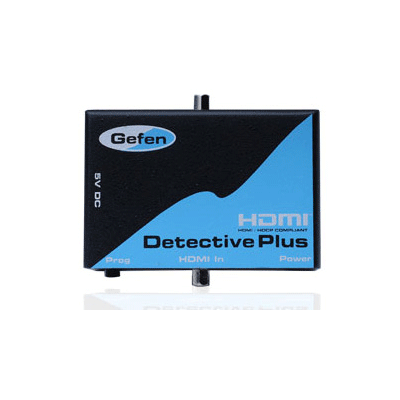
Dealing with this oddity became tiresome after some time. Just when I was mulling a different graphics card option, I came across the HDMI Detective Plus, a nifty little accessory from Gefen meant to address this very issue.
The HDMI Detective Plus sits in the middle of the display and the source. Its job is to trick the source into thinking that it is always connected to the display. It does this by saving the display’s EDID information into its internal memory, which it transmits continuously. As far as the source, the HTPC in my case, is concerned, the display is always connected.
Setup
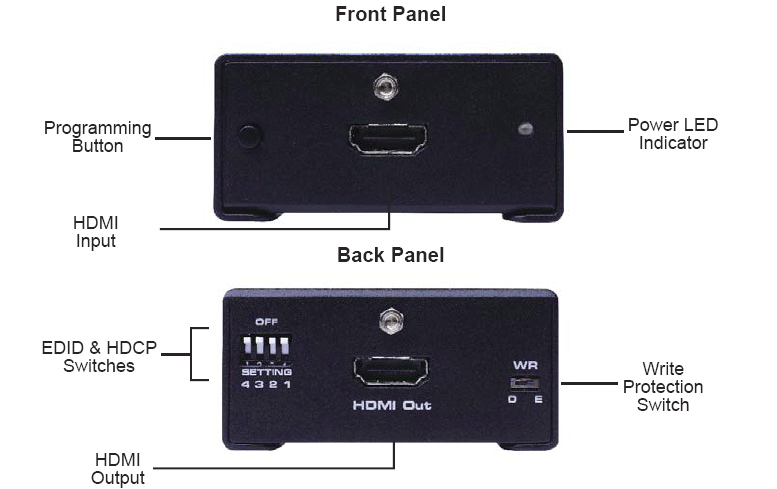
Setting up the Detective is both quick and easy. The initial step requires programming the Detective to store the display’s EDID information into its internal memory. Two options are provided: automatic and manual. In the automatic mode, the option I used, you power the Detective with the supplied power supply and connect it to your display. The DIP switches all need to be in the off position, and the write-protect switch needs to be in the E, write enabled, position. The EDID recording sequence is then initiated by holding down the program button. Once the LED starts to rapidly flash green, the program button can be released. A transition of the LED to a solid green color indicates a successful programming sequence. Once the programming is complete, the external power supply can be disconnected and put away. A red LED indicates an unsuccessful programming. If this happens, check the position of the DIP switches and the position of the write protect switch; then power-cycle and re-try. If programming is still unsuccessful or if you need to force a specific resolution and audio combination, use the manual option.
In Use
In manual mode, DIP switches one through three are used to select from one of five pre-programmed EDIDs. The combination of the on/off position of each DIP switch determines which pre-programmed mode gets selected. Once the DIP switches are in their respective positions, the Detective can be programmed in the same way as the automatic mode.
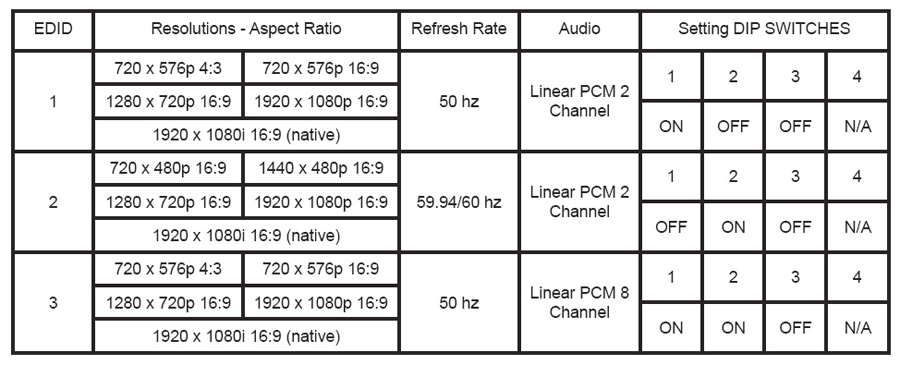
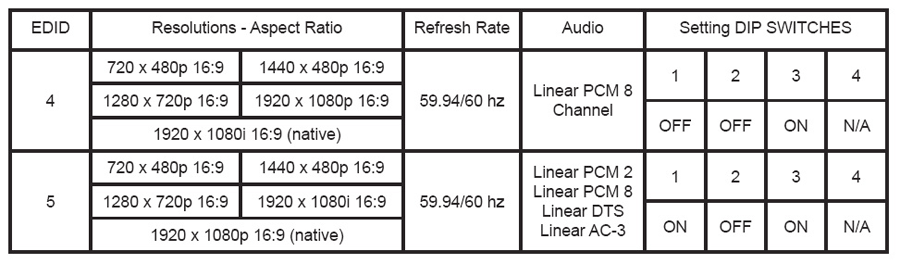
DIP switch four controls the pass-through of HDCP. This DIP switch needs to be enabled, regardless of the programming mode, to enable HDCP pass-through.
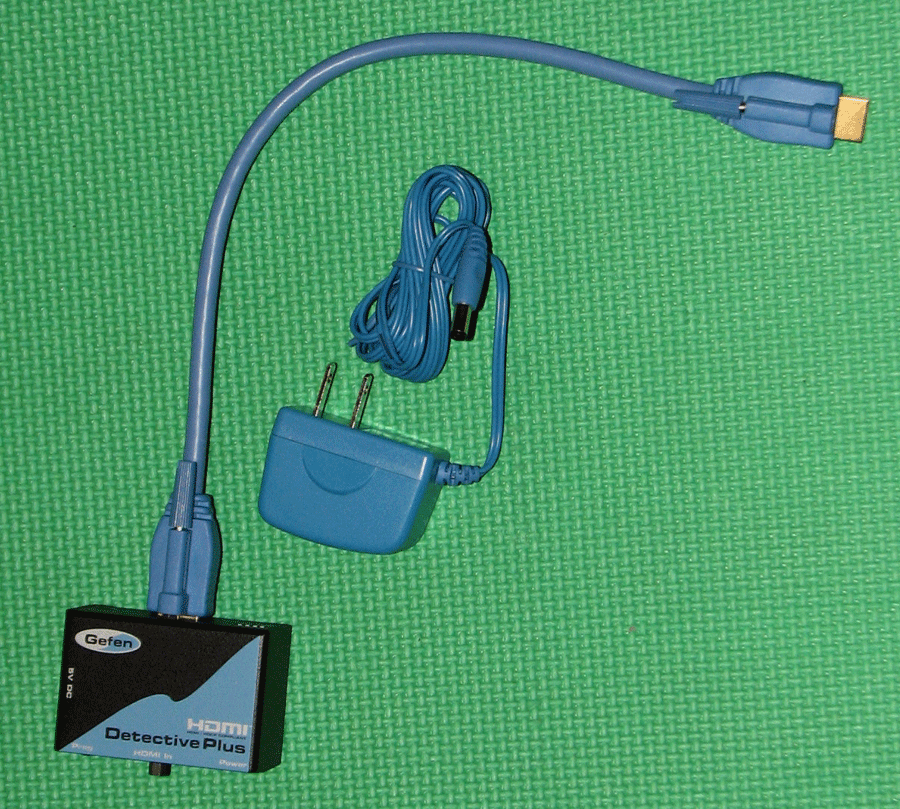
The Detective comes with a locking HDMI cable. The locking mechanism adds to the height of the cable, which may make it unsuitable for some installs. In my case, the HDMI inputs on my display are tightly spaced and they are stacked vertically. With the supplied cable, adjacent inputs were not useable. I, therefore, resorted to a conventional non-locking HDMI cable in my install.
When I first powered on the unit, the green LED was on, which according to the manual indicates that the unit was already programmed. Since I was uncertain of the pre-programmed settings, I went ahead with the programming sequence to record my display’s EDID into the Detective’s internal memory.
Once programmed, the Detective worked without a hiccup in my system. The act of switching inputs or powering off the display no longer resulted in a resolution switch!
Conclusions
The HDMI Detective Plus has become a permanent fixture in my HTPC setup. The resolution issues are a thing of the past. It is easy to setup, it has a small footprint, and it works flawlessly. The Detective is an invaluable accessory for anyone who has been plagued by EDID loss related problems.